Know which stores need attention, who is responding and what still needs follow-up.
Retail incident management software helps retail groups capture store reports, coordinate the appropriate response and keep a record for review. For head office, the important question is whether authorised users can follow relevant incidents across their locations while local teams retain clear responsibility.
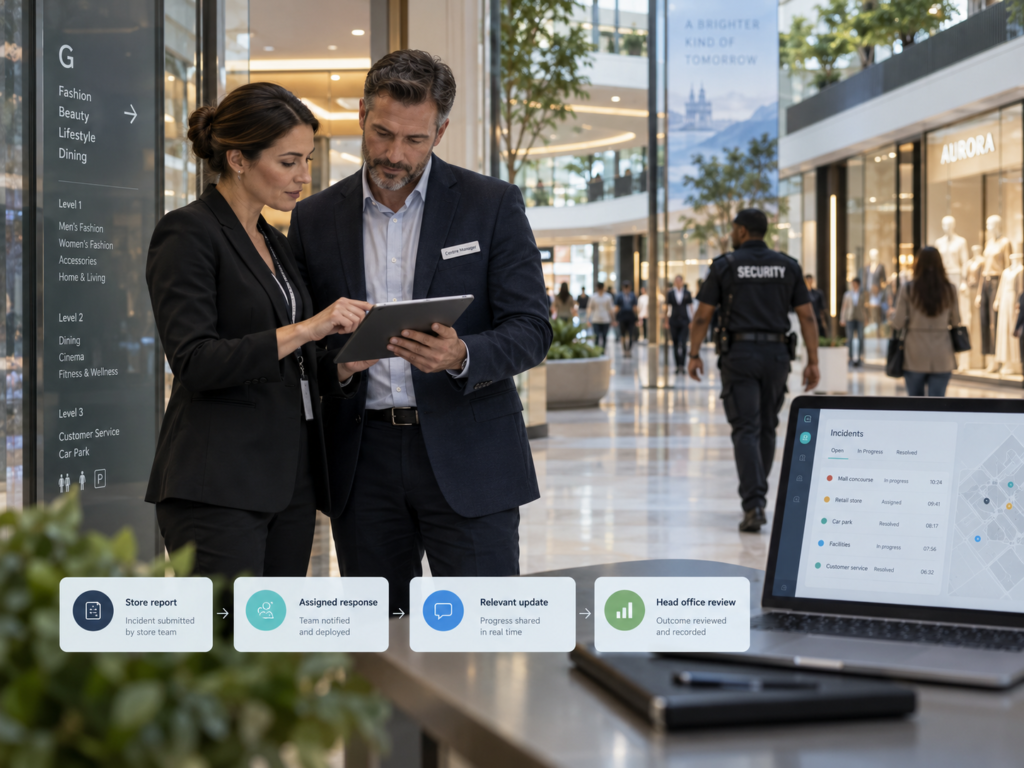
Consider a familiar situation. An employee reports an incident to a store manager. Local security responds. A regional manager receives a message and forwards an update to head office. When someone asks who is handling the situation and what happened next, several people need to reconstruct the answer.
Now consider a connected workflow: the store reports the incident, the appropriate responder accepts responsibility, relevant updates stay with the record, and authorised head office can follow the situation affecting its location.
NevaSolo Enterprise’s brand and head-office visibility connects that oversight with the local incident-response process. It brings participating stores, security teams and venue management into a role-scoped workflow, with brand users able to review permitted information across assigned locations.
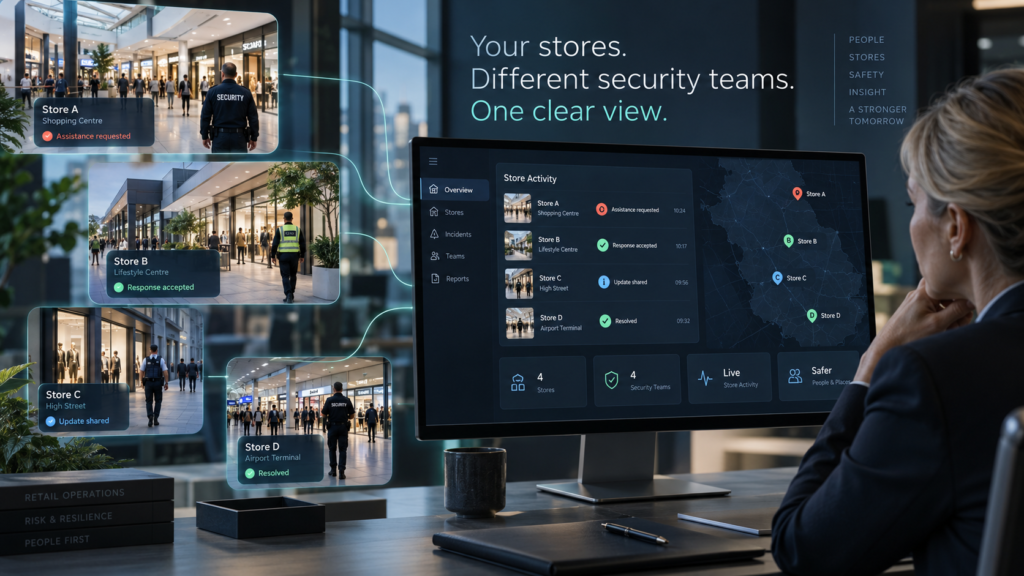
One retail brand. Different local teams. A connected view of the response.
This guide is for retail operations leaders, group security and risk managers, owners and COOs assessing a better process across multiple stores. It explains what to look for, how the participants connect and how to evaluate the fit for your brand.
In this guide
- Why head office needs a clearer incident picture
- What useful store reporting captures
- How group-wide oversight works
- Working with different centres and security providers
- See a store-to-head-office example
- Permissions, privacy and local responsibility
- The software demonstration checklist
- Existing tools and staff adoption
- Rollout, costs and measuring value
- FAQs: pricing, participation and international use
- Request a retail-group demo
Why does head office need better visibility into store incidents?
Head office needs enough context to identify where attention is required, understand the local response and arrange appropriate follow-up. A useful group-wide process connects the original report with responsibility, progress and the recorded outcome.
Start with one recent incident from your own retail group. Could an authorised manager establish which store was affected, who accepted responsibility, what action followed and whether anything remained outstanding?
WorkSafe Victoria’s guidance on aggression and violence recommends accessible formal reporting for large organisations. It specifically discusses reviewing reporting trends across multiple locations and considering whether a systematic organisational response is needed. That provides a practical reason to make store-level information available for appropriate group review.
Maintain an internal incident picture
In the National Retail Federation’s July 2026 research release, 63% of surveyed retailers said they reported fewer than half of their store-related theft incidents to law enforcement. The commercially sponsored survey covered 66 companies representing 143 brands. This measures external reporting, rather than whether retailers recorded incidents internally.
The management implication is to maintain your own relevant records alongside any police or regulatory reporting. A situation can require employee support, a local response or operational review whether or not an external report follows.
NevaSolo gives authorised head-office users a way to follow reported incidents affecting their assigned stores. Use that visibility to identify where a conversation, decision or further review is needed.
What should retail incident reporting capture?
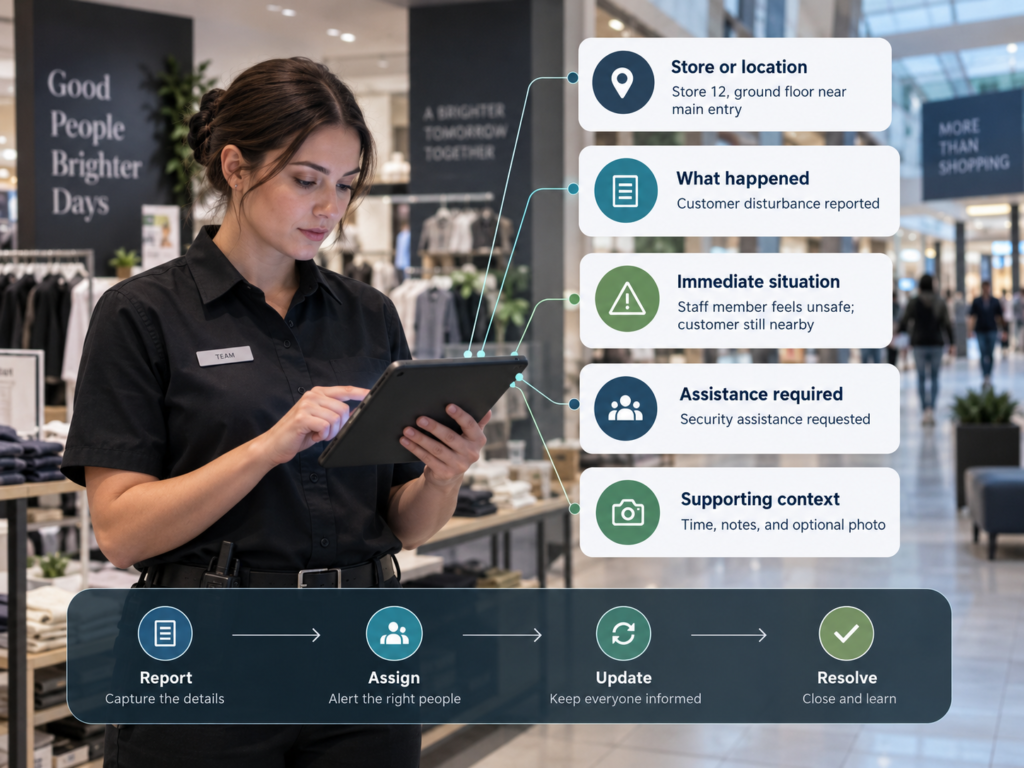
Useful retail incident reporting captures enough information to identify the location, understand the situation and connect it to the appropriate response. Keep the initial task manageable, then add relevant detail as the incident develops.
The UK Health and Safety Executive’s reporting guidance identifies complicated procedures and the belief that nothing will happen as barriers to reporting violence or aggression. It recommends accessible recording methods, including online or mobile applications, and demonstrating that reports lead to action.
| Information | What it helps establish |
|---|---|
| Store and exact location | Where assistance or attention is required. |
| What happened and when | The circumstances and timing of the report. |
| Current situation and assistance needed | The immediate issue the response team needs to understand. |
| Relevant notes or media | Supporting context collected when appropriate, safe and permitted. |
| Responsibility and progress | Who is handling the report and what action has been recorded. |
| Outcome and further action | What was resolved and what management should follow up. |
Use these as process requirements when assessing the software; confirm how each is represented in the proposed setup. Let staff provide essential context first rather than delaying a report until they can reconstruct every detail.
NevaSolo’s incident workflow connects reporting with assignment, acceptance, updates and resolution. Authorised participants can follow information relevant to their role as the response develops.
Report → route → accept → update → resolve → review.
Train employees to follow the venue’s emergency procedures and contact local emergency services directly when immediate assistance is required. Use the reporting process alongside those arrangements.
How can head office follow incidents across multiple stores?
Multi-site incident management needs a consistent reporting and response process, with visibility limited to each user’s authorised locations and incidents. The goal is to give management usable information for decisions across the participating group.
NevaSolo’s brand portfolio access is based on explicitly assigned locations and permitted incidents. This lets head-office users follow relevant store situations while the centre and security team handle their local responsibilities.
| Management question | Information to examine |
|---|---|
| Which stores need attention? | Relevant reported incidents and their current status. |
| Who has accepted responsibility? | Assignment and acceptance within the local response process. |
| Is further support needed? | The latest permitted updates and store context. |
| What happened afterwards? | The recorded outcome and information supporting follow-up. |
| Should we review similar situations elsewhere? | Relevant incident histories examined by authorised managers. |
For a retail operations leader, this supports deciding where to direct attention. A security manager can review response information. A risk or people team can use appropriate records to inform further action. An owner or COO can ask whether the group’s reporting and response process is functioning as intended.
Interpret the records alongside participation. A store with few reports may need a conversation about how staff use the process. Review incidents together with staffing, trading hours and local circumstances before comparing locations.
During the demonstration, move from the brand’s portfolio view into an individual store incident. Check that the information available answers the questions your management team actually asks.
How does it work across different centres and security providers?
A retail group can have one head office and many local response arrangements. Stores may operate in shopping centres, malls or precincts managed by different organisations, each with its own security provider and procedures.
Make those relationships part of the setup. Identify the participating store, its relevant response team, the venue-management role and the head-office users who need oversight.
US OSHA’s guidance on multi-employer communication and coordination recommends clear information exchange, agreed responsibilities and ways to report hazards and incidents between relevant employers. This is general safety guidance whose application depends on the actual working relationships.
NevaSolo’s shopping-centre coordination model brings participating tenants, security and centre management into the incident workflow. Authorised brand users can then follow relevant store incidents through their assigned portfolio.
Agree participation before promising coverage
Map which stores, centres and providers will participate. Where a location’s response team has not joined, establish the supported arrangement and onboarding requirements before including that location in the rollout scope.
Keep responsibility for local response explicit. Head office gains relevant visibility; the operational users retain the authority assigned to their roles.
For the venue-side perspective, read how to improve shopping centre communication. The retail-group view connects those local relationships to the brand’s wider oversight needs.
What does a store-to-head-office workflow look like in practice?
This illustrative scenario assumes that the relevant stores, users, permissions and response relationships have been configured. It is a demonstration example, rather than a measured customer result.
A retail brand operates stores across several shopping centres with different security providers. At one location, an employee reports aggressive behaviour near the store entrance. The team follows its safety procedures, and local assistance is required.
1. The store raises the incident
An authorised employee or store manager records the location and relevant circumstances in NevaSolo. Supporting context is added when appropriate and safe. The report becomes the reference point for the participating response team.
2. The relevant local responder accepts responsibility
The incident enters the configured response process. An assigned responder accepts it, and authorised participants can follow the recorded status. Acceptance establishes ownership; physical attendance is recorded and assessed separately where the process supports it.
3. Local teams keep the response connected
Relevant updates and actions are recorded against the incident. Centre management can review information within its scope and coordinate further local action. Any required operational notice is sent by an authorised user to the appropriate audience.
4. Authorised head office follows its store’s situation
A brand user with the relevant portfolio access can review the incident and permitted response information. Head office can determine whether the retailer needs to arrange additional store or employee support through its own procedures.
5. The outcome supports follow-up
An authorised operational user records resolution when appropriate. The incident history gives management context for reviewing the response and deciding on further action. Any ongoing employee support or investigation continues through the employer’s established process.
The reporting store, local responders and authorised head office can now refer to the same incident, each within their permitted view. That is the cross-company workflow to test for your brand.
See this with your retail group’s operating structure.
Bring one store incident and your local security arrangements. Walk through reporting, responsibility, response updates and authorised head-office visibility in NevaSolo Enterprise.
How do you protect store information and keep local responsibility clear?
Define who can view an incident separately from who can assign work, respond or record resolution. Give head office the information needed for oversight, with operational actions governed by the relevant roles and permissions.
In NevaSolo, brand oversight follows explicitly assigned locations and permitted incidents. Staff access remains scoped to their tenant and authorised participation. Sharing a centre or brand does not by itself grant every user access to every store’s records.
The Office of the Australian Information Commissioner recommends need-to-know access to personal information according to a person’s role or function. Apply your organisation’s privacy requirements when deciding who receives incident details, media and updates.
Test the same example through a store employee, security responder, centre manager and brand account. Check both the information visible and the actions available. Then test the boundaries between two stores.
Include access maintenance in the operating process: who adds a new store, who updates a user’s responsibilities and who removes access when staff or providers change. Confirm the data-handling, hosting, retention and export arrangements required for your proposed deployment.
Useful head-office oversight should come with a clear explanation of who sees what and why.
What should you look for in retail incident management software?
Evaluate retail incident management software using a scenario that involves a store, its local response team and head office. Ask each participant to complete their part of the workflow using the permissions they would actually receive.
| Requirement | Ask to see |
|---|---|
| Practical retail incident reporting | A store employee creating a usable report and finding relevant updates. |
| Clear responsibility | How an incident is assigned, accepted, updated and resolved. |
| Cross-company coordination | A tenant, security team and venue manager participating in one scenario. |
| Group-wide oversight | A brand user reviewing permitted incidents across assigned stores. |
| Controlled access | Different roles and stores viewing the appropriate information. |
| Relevant operational updates | An authorised sender selecting an audience and issuing a notice. |
| Continuity and review | An authorised person finding the incident history and continuing the process. |
| A workable rollout | The required users, provider participation, onboarding and support arrangements. |
Include procurement and technical questions alongside usability: security controls, data ownership, retention, exports, availability, support and any integrations your group requires. Ask for answers tied to the proposed deployment.
Use NevaSolo’s Enterprise incident-management use cases to identify a suitable scenario, then bring this checklist to the demonstration. The useful outcome is knowing how the proposed system fits your stores, response partners and management responsibilities.
How does this fit with existing tools and busy store teams?
Start by mapping the process you already have. Identify where employees report, where local responders work and where head office reviews the information. Agree which tool holds the record at each stage and how any required information moves between them.
“We already have incident reporting software.”
Test whether your current system connects the store report to accepted responsibility, current response information and authorised group oversight. A reporting form may already meet part of the requirement. Use the demonstration to assess any remaining coordination needs and the proposed role of NevaSolo.
“The shopping centre already provides security.”
Use that local arrangement as the starting point. Establish how the store reports an issue, how the relevant team participates and how your brand follows the permitted response information. Review the configuration with the participating provider and centre.
“Our stores cannot take on more administration.”
Ask a store employee to complete a report during the evaluation. Identify any duplicate calls, messages or re-entry that the proposed workflow would remove, then confirm which existing reporting obligations remain. Assess the total task, including follow-up, rather than judging only the reporting screen.
For adoption, define the incident types staff should report, who maintains access and how employees find subsequent updates. Practise a routine scenario before relying on the process during a real incident.
How do you roll out multi-site incident management and measure its value?
Begin with a defined set of participating stores that represents the arrangements you need to support. Include the relevant security teams, venue contacts and authorised head-office users, and agree the incident workflow before expanding.
Set up a practical pilot
Nominate the process owner, map the participating locations and confirm permissions. Test notifications, reporting, acceptance, updates and resolution. Agree escalation and fallback communication arrangements for connectivity, device or participation problems.
Use a recent example to establish your baseline. Record how the current process works and what it takes to obtain a reliable update.
Measure outcomes using your own stores
Germany’s EHI Retail Institute’s June 2026 study release estimated €1.6 billion in additional internal activities associated with theft risk, including stock controls, training, analysis, security-tag handling and reporting. The study involved 103 companies or retail divisions operating 21,225 stores. This broad industry estimate illustrates the work surrounding loss prevention; evaluate communication effort separately within your own group.
| Measure | What it helps assess |
|---|---|
| Report-to-acceptance time | How quickly a report gains a confirmed owner. |
| Reports awaiting ownership or an outcome | Where the process requires attention. |
| Staff-minutes spent obtaining updates | Coordination effort across the people involved. |
| Completeness of the record | Whether management has useful information for review. |
| Reporting employee’s awareness | Whether appropriate follow-through is visible. |
| Participation across stores | Whether the group is using the process consistently. |
Calculate your coordination baseline as: reports per month × average staff-minutes spent obtaining updates per report ÷ 60. Add time across participating staff and keep the measurement consistent during the pilot.
Record physical attendance separately from acceptance. Interpret changes in incident counts alongside reporting participation and comparable operating conditions.
Build a scoped commercial decision
Request a quote covering your stores, participating organisations and head-office requirements. Confirm the charging basis, onboarding responsibilities, support, inclusions and contract terms. Compare the proposed cost with your measured coordination effort and the oversight your managers need.
A defined pilot turns the discussion into a practical question: does this workflow give our brand clearer, usable oversight?
Retail incident management software FAQs
What is retail incident management software?
Retail incident management software supports reporting, responsibility, response updates and records for incidents affecting physical stores. For a multi-store brand, it should also give authorised users a way to review relevant incidents across assigned locations and support appropriate follow-up.
How does retail incident reporting relate to incident management?
Retail incident reporting captures the initial information. Incident management carries the process through responsibility, response, updates, the recorded outcome and review. When comparing systems, test the complete journey from the employee’s report to head-office visibility.
Can head office see incidents across several stores?
NevaSolo’s brand users can follow permitted incidents across explicitly assigned locations. The setup defines which stores and records each user can access. Request a demonstration with multiple stores to review both the portfolio experience and the access boundaries.
Can NevaSolo work with different security providers?
NevaSolo supports coordination between participating stores, venue teams and security organisations. Map each location’s provider and response relationship during setup. Confirm the required participation and supported workflow for each site included in the proposed rollout.
What happens when a store’s centre or provider has not joined?
Include that location in the scoping discussion. Establish which participants are required, the onboarding arrangements and any supported operating approach before promising the connected workflow there. Confirm the stores covered by each stage of deployment.
Does head-office visibility change who controls the local response?
Brand users receive authorised oversight of relevant incidents. Assignment, operational response and closure remain subject to the permissions of the local operational roles. Demonstrate the same incident through brand and responder accounts to see the distinction in practice.
Can one store see another store’s incident information?
Access follows the configured tenant, location, role and incident permissions. Shared brand membership alone does not grant store staff access to other stores’ records. Authorised head-office users can have a specifically assigned portfolio spanning multiple locations.
Can we keep our radios, reporting tools and other systems?
Review where each existing tool fits in the proposed workflow. Radios can remain part of local voice communication while relevant actions are recorded through the agreed process. Identify integration, export or information-transfer requirements during scoping and confirm what is supported before deployment.
Will retail incident management software reduce theft?
Clear reporting and coordinated responses can support a retailer’s wider loss-prevention process. NevaSolo’s role is to connect reports, responsibility and relevant visibility. Assess theft outcomes through your own evidence and comparable operating periods; a numerical reduction requires measured results.
Can we use NevaSolo across an international retail group?
Discuss the intended countries and operating requirements before committing to rollout. Confirm availability, languages, time-zone handling, support, hosting, data arrangements and applicable local requirements. Agree the supported scope for each region as part of the proposal.
How much does NevaSolo Enterprise cost for a retail brand?
Request a quote based on your locations, participating teams and head-office requirements. Ask for the charging basis, onboarding, support, included capabilities and contract terms together. Evaluate the proposal against the workflow and pilot measures agreed for your group.
How do we get NevaSolo Enterprise for our brand?
Request a retail-group demonstration with your brand name, approximate store count, countries and security arrangements. Bring one recent incident or coordination problem. Use the walkthrough to agree participation, permissions and the scope of the next stage.
Give your brand a clearer view of the next response
Choose one recent incident from your retail group. Could head office establish who accepted responsibility, what action followed and whether further attention was required?
Use any gaps as your demonstration agenda. NevaSolo Enterprise connects store reporting, local response and authorised brand oversight, with the relevant participants working from a shared incident record.
For a retail operations leader, that means information to direct attention. For a store team, it means a defined reporting and response process. For an owner or COO, it means a practical way to evaluate how the group maintains oversight as it grows.
Bring your brand. Bring one incident. See how the response connects.
Walk through the store report, local security response, permitted management views and the setup your group would need.
Request your NevaSolo Enterprise retail-group demo
Mention “retail group oversight” and include your approximate store count and countries.
Research figures are attributed to their original organisations and study periods. Guidance is referenced in its jurisdictional context. Align your reporting, safety and privacy procedures with the requirements applying to your business.

3 Comments
Shopping Centre Communication: Connect Tenants & Security · 11/10/2026 at 10:19 am
[…] a retail brand with stores in several centres, each using a different security provider. Head office needs store-relevant information, while each […]
Security Guard Management Software: 7 Ways to Win Contracts · 11/10/2026 at 10:55 am
[…] providers and guards with participating clients, tenants, staff, centre management and authorised brand head offices. Managers oversee their permitted operational scope while client users see the information relevant […]
Pub Incident Reporting: An Owner’s Guide to Better Control · 11/10/2026 at 2:33 pm
[…] group oversight, our retail head-office incident management guide explains the same location-and-permission planning […]