Stay informed when you’re away, delegate the response clearly and keep your venue’s staff and security team connected.
Pub incident reporting works best when it connects the request for help, the person responding and the outcome. For a publican, that means knowing who is handling a problem, what needs your attention and what happened while you were away.
It is Friday evening. A floor employee needs assistance in the beer garden. The duty manager is covering the bar, security is elsewhere and you are away. Can your team handle the situation, and can you get an update without calling several people?
NevaSolo Enterprise connects your venue staff, duty managers and security provider around the same incident. Staff raise the report, the relevant team takes responsibility, and owners can review updates and outcomes through their management account. Access and management actions are set for each person’s role during setup.
Your team handles the response. You stay informed and step in when your decision is needed.
See the busy-night example or jump to the software buying checklist.
See what you could oversee when you’re away.
Bring one recent incident to a demo. We’ll walk through the staff, duty-manager, security and owner views, then explain the setup for your venue.
Request a pub or nightclub demo
In this guide
- What a useful reporting process does
- Remote oversight and less chasing
- Connecting staff with security
- Clear responsibility and follow-through
- What to record
- What nightlife research shows
- Security changes and handovers
- A busy-night example
- Nightclubs and venue groups
- Software buying checklist
- Setup, handover and value
- FAQs: radios, access, pricing and registers
- Request a venue demonstration
What is pub incident reporting?
Pub incident reporting records a situation affecting people, safety or venue operations and communicates it to the response team. Capture the concern, actions taken and any further follow-up. This guide covers that operational process for pubs, bars and nightclubs.
Reports may concern a request for security assistance, an injury, threatening behaviour, patron welfare, damaged access or another hazard. Your procedures should identify which events need immediate help, management review or a required register entry.
Report → assign → accept → update → record the outcome → review.
Agree the process with your duty managers and security provider, including when to call you directly. Use the venue’s emergency procedures whenever urgent assistance is required.
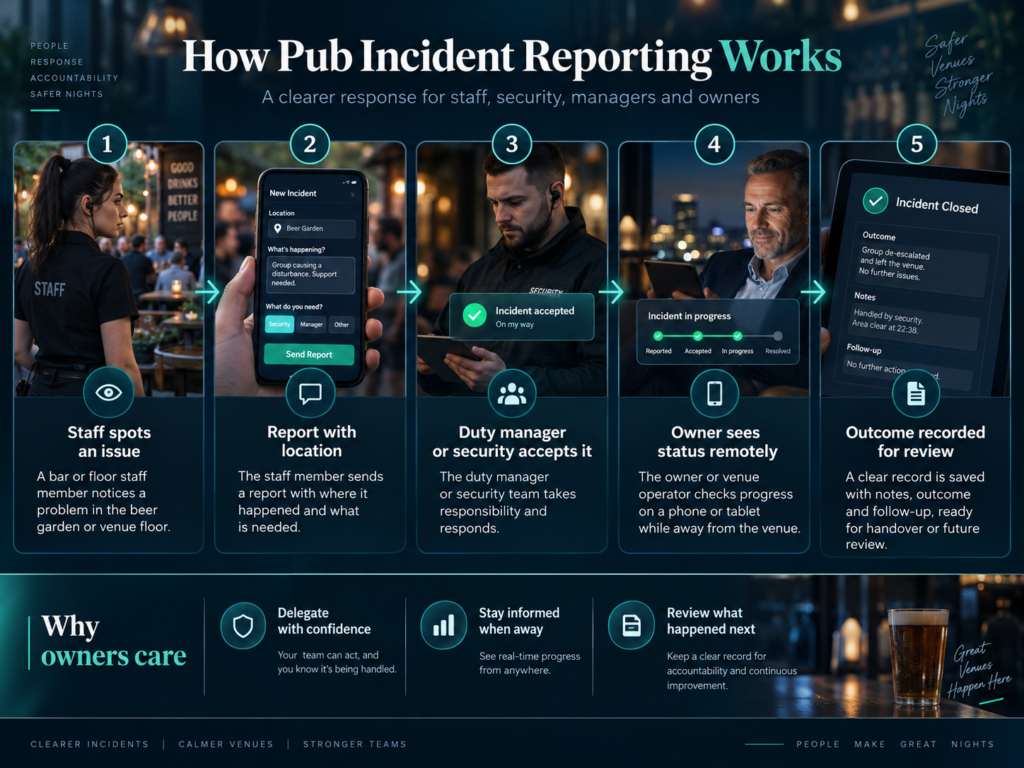
How does pub incident reporting make the owner’s life easier?
You should be able to answer three questions: who is handling it, do they need me, and what happened next? The on-duty team manages the response while you review relevant updates through your management account.
| Your question | What to look for |
|---|---|
| Who is handling this? | An assigned responder and recorded acceptance. |
| Do they need support? | The current situation and latest response updates. |
| What happened last night? | The report, actions taken and recorded outcome. |
| What remains outstanding? | Open matters and a documented next action. |
| What needs my decision? | A clear escalation from the duty manager, with the relevant context. |
In the demo, compare your owner account with the duty manager’s account. We’ll show the available information and which roles can assign incidents, add updates and record resolution.
Agree when the duty manager should call you and which decisions they can make themselves. The shared record supports that delegation as the team adds updates.
Keep the required on-site management in place. Queensland’s approved-manager guidance, for example, sets presence or availability requirements for certain premises, including specified late-night trading periods. Check the arrangements that apply to your licence and jurisdiction.
Give the on-site team authority to act and give yourself a clear way to follow the result.
How should bar and floor staff request security assistance?
Give staff a consistent way to request help from the on-duty response team. Include the venue area and enough detail to explain the situation. Brief staff on when to use immediate assistance or fallback communication.
Queensland’s bar-staff training uses an example where a floor worker notices patron behaviour outside the bar team’s view and informs management. Its discussion prompts ask how information moves between different bars, rooms and areas, including darker, noisier and busier settings.
Ask the person collecting glasses how they would request help from the beer garden. Check that a new employee knows the route when their usual supervisor is elsewhere.
In NevaSolo, staff with reporting access create an incident for the venue’s response team. Relevant security and management users handle it through their accounts. Test this together before the first busy shift.
The UK HSE recommends quick, accessible incident-reporting methods, including online or mobile applications. It also emphasises showing workers that reports lead to action.
For immediate danger, follow the venue’s emergency procedure and contact local emergency services. Prioritise on-site safety and required assistance; complete supporting documentation when it is safe and within the applicable reporting requirements.
How do you delegate the response without losing visibility?
Delegate the incident to a responsible person and keep updates with the report. Agree who assigns the response, who accepts it, who supervises it and who can record resolution.
The duty manager coordinates the venue response while the assigned security supervisor or guard handles their part. NevaSolo keeps their recorded actions and updates connected to the incident, subject to each role’s access.
Set the escalation rules: when should the manager call you, seek additional assistance or involve another organisation? Record important decisions for the next person taking over.
Acceptance means responsibility has been accepted. Record physical attendance separately when you need to measure when someone reached the location.
WorkSafe Victoria’s guidance on responding to aggression and violence recommends a clear response system, training for people handling reports and communicating investigation outcomes to appropriate parties.
At handover, the incoming manager should be able to identify the situation, responsible person and next action from the record.
What should a pub incident report include?
Record what the responder needs first, then complete the response and outcome. Use this operational checklist alongside the mandatory fields, signatures and time limits that apply to your venue.
| Information | What to capture |
|---|---|
| Time and location | When the incident occurred or was reported, the venue and the specific area. |
| What happened | A factual description; distinguish what was observed from what another person reported. |
| Immediate assistance | The concern, current conditions and the help requested. |
| People involved | Relevant staff, responders and witnesses; handle personal details under the appropriate access controls. |
| Responsibility and actions | Who accepted the response, attendance where recorded, and what action followed. |
| Supporting information | Relevant notes, permitted media or references to separately secured evidence. |
| Outcome and follow-up | The recorded outcome, any remaining action and the person responsible for it. |
Describe the location precisely—for example, “broken glass beside the beer-garden entrance”. Add relevant media only when safe, appropriate and permitted.
Example report wording
Illustrative operational record; adapt it to your procedures and required fields.
Location: Beer-garden entrance.
Observed: Broken glass across the doorway; no injury reported at the time.
Response: Duty manager informed, pedestrian access redirected and cleanup allocated.
Outcome: Area checked before reopening.
Handover: Incoming manager asked to review the glass-collection route.
How does this relate to your liquor incident register?
Queensland’s security and incident register guidance sets out when registers are required and details such as incident circumstances, actions and signatures. Its electronic-register rules include restricted access and protection against alteration or deletion.
NSW has its own incident-register requirements and digital incident register guidelines. Apply the rules for your licence and location.
Keep your required register arrangements in place while assessing a new system. Before using NevaSolo for that statutory purpose, verify the applicable fields, signatures, record integrity, retention, access and inspection requirements. This guide addresses operational reporting; obtain jurisdiction-specific advice for compliance decisions.
Why does confidence in the response matter?
A reporting process needs to be supported by staff who know how to receive a concern and respond appropriately. Nightlife research shows why that confidence deserves attention.
A 2025 study of reporting in Australian nightlife settings examined 320 adults who had experienced nightlife-related sexual harassment. In the relevant subgroups, 35.4% of those experiencing physical sexual harassment and 37.9% of those experiencing pressured sexual contact reported or disclosed it to someone at the venue or after leaving. Uncertainty about staff responding appropriately was among the barriers identified.
A related study, first published online in May 2025, found that 46% of the physical-harassment subgroup reported avoiding certain venues or places as a consequence. That subgroup included 183 people within an overall sample of 467.
Both studies draw on the same broader 2023 recruitment programme and self-reported experiences. The figures describe selected study participants, rather than all patrons, and the avoidance finding measures reported behaviour rather than venue revenue.
For your venue, use these findings to review staff training, reporting routes and appropriate support. Receive disclosures sensitively, explain what will happen next and protect the information shared. Provide an alternative confidential route when the concern involves someone in the usual management chain.
The practical management task is to ensure someone takes responsibility for the appropriate response and follow-up. Use the incident process alongside that training and support.
What happens when your guards or security provider change?
Keep the reporting process familiar for venue staff as the responding personnel change. Before the next shift, confirm who is on duty, update access and assignments, brief the team and test a report.
A different guard or supervisor is working tonight
The manager responsible for access and assignments checks the incoming guard or supervisor’s setup, venue areas and open matters. Once tested, staff continue using the agreed reporting route.
Your venue appoints a different security company
Agree the changeover with the venue and providers: who joins, who loses access, who takes open incidents and who can see earlier records. Confirm these arrangements with NevaSolo before changing providers.
| Check | Agree before the handover |
|---|---|
| On-duty responsibility | Who supervises the response and who accepts reports for each relevant area. |
| User access | Which accounts need access, which should lose it, and who makes those changes. |
| Open matters | The current position, next action and appropriate incoming contact. |
| Historical information | Who has a lawful, permitted need to retain or access earlier records. |
| Test and fallback | Confirm the new reporting route and the contact procedure if it is unavailable. |
The US OSHA guidance on coordinating with contractors recommends agreeing responsibilities and exchanging relevant safety information before work starts and when circumstances change. It is general multi-employer guidance, useful when reviewing the relationship between a venue and its external security team.
Historical research also highlights continuity: the 2004 Safer Bars trial in Toronto found that manager and door/security turnover moderated the benefits of its training and risk-assessment intervention. This supports attention to handovers; the study evaluated those interventions rather than incident software.
Our guide to security guard management software explains the provider’s side of client reporting and coordination.
What does a coordinated response look like on a busy night?
Illustrative example: users, response relationships and permissions are set up. An appropriately appointed manager and the participating security team are on duty; the owner is away.
A floor employee reports a developing disturbance near the beer-garden entrance. The duty manager is covering another area and security is positioned across the venue.
1. The employee raises the concern
The employee follows the venue’s assistance procedure and creates the report when safe, adding the beer-garden location and relevant context. The response team receives it. Immediate danger uses the venue’s emergency arrangements.
2. A responder accepts responsibility
The responder accepts responsibility. The duty manager and other users with access can follow the status while the on-site team handles the situation.
3. The owner can follow relevant updates
You open your management view and review the report, accepted responsibility and recorded updates. The duty manager calls if your decision is needed. A team member with the relevant permission records important instructions.
4. The outcome is recorded
A user with resolution permission records the outcome. Notes capture actions and remaining follow-up; the team also completes any other required venue records.
5. The next-day review has a starting point
You review the record with the duty manager, confirm any remaining action and check whether staff need support. The documented sequence gives the conversation a clear starting point.
The staff member has a route to help, the response has an owner and management has a record to review.
See your venue’s reporting and response in one walkthrough.
Bring a recent incident and your security arrangements. We’ll show how staff, the duty manager and security work together—and what you can follow when you’re away.
Request a pub or nightclub demo
How does this work for nightclubs and multi-venue owners?
Nightclub incident reporting should make the location and response clear during a busy shift. Set up the areas your team uses: entrances, dance floors, bars, quieter spaces and external access points.
Brief incoming security personnel before the shift. Agree who can issue targeted operational broadcasts and which staff need those instructions.
For a pub group, an owner’s account can cover explicitly assigned participating venues. Keep local access scoped and test the portfolio view during setup.
For group oversight, our retail head-office incident management guide explains the same location-and-permission planning model.
For a shared site or precinct, see our guide to communication across a multi-tenant venue.
What should incident reporting software for pubs include?
Test incident reporting software for pubs with one real scenario and the people who would use it. Follow the report through to owner review and ask to see each person’s account.
| Requirement | Ask to see |
|---|---|
| Staff reporting | A practical report from the floor or bar, with the correct venue area. |
| Response ownership | How a report is assigned, accepted and updated. |
| Owner and duty-manager access | The information and actions available to each authorised account. |
| External security participation | Your provider and venue staff working through the same scenario. |
| Sensitive information | How incident visibility differs between roles and locations. |
| Records and handover | The history another authorised manager can review, with any required export or retention checks. |
The OAIC recommends need-to-know access to personal information. Apply that principle when deciding which staff, managers and security users need incident details. Record only the personal information appropriate to the task and applicable requirements.
Test devices, reception and notifications in the working areas. Agree device responsibility and fallback contacts, then verify any integration or register function you need.
NevaSolo’s incident workflow connects the staff report, response and management review. Use the demo to test that complete journey with your venue’s roles.
How do you get started and judge the value?
Our founder personally helps with venue onboarding. Start with your pub’s layout, staff and security arrangements. We’ll help you map the agreed reporting and response process, then walk through it with your team.
Map the people and responsibilities
You provide the venue areas, manager and staff details, security-provider contacts and one typical incident. Together we agree roles, access, response responsibilities and escalation contacts. Confirm the onboarding scope during the demo.
Practise before a busy shift
Practise reporting, acceptance, updates and resolution before a busy shift. Check your owner view, the incoming manager’s access and fallback communication, while retaining the regulatory records your venue requires.
Measure the difference in your own venue
Compare similar shifts: time spent chasing updates, repeated calls, reports awaiting an owner, outcome completeness and staff understanding. Account for patron numbers, staffing and reporting participation.
Add the staff-minutes spent chasing updates and divide by 60 to calculate coordination hours for the period. Use your venue’s results to assess any change.
Interpret incident counts alongside how consistently staff report. Look for a clear response process and information management can use, rather than judging success by the count alone.
Ask for the current pub and nightlife founder offer, including the monthly fee, GST treatment, users, onboarding and contract terms. Assess the scope against the workflow demonstrated for your venue.
Pub incident reporting FAQs
Can I follow pub incidents when I am away from the venue?
Yes. Your management account shows the incidents and updates you have permission to access. Keep the required on-site manager in place and agree when the team should call you.
Can bar and floor staff report directly to the security team?
Staff with reporting access can raise an incident for the venue’s response team. Set up and test security participation first, alongside the venue’s immediate-help and fallback procedures.
Can we keep our existing security provider?
Your existing provider can participate in the proposed workflow. Agree their users, access and responsibilities, then run a joint example with your venue team before rollout.
Can we keep using radios?
Yes. Keep radios and direct calls for the situations your procedures identify. Record relevant instructions, actions and outcomes so managers can follow the response afterwards.
What happens if connectivity or a device fails?
Use the agreed fallback contacts and emergency procedures. Test reception and devices beforehand, and confirm the app’s current offline behaviour before relying on it. Complete required records through the available approved process.
What happens when guards or the security company change?
Plan access, assignments, open matters and historical-record permissions with the incoming team. Confirm provider-change arrangements with NevaSolo and test the reporting route before changeover.
Is this suitable for nightclub incident reporting?
The same reporting-to-response approach applies to nightclubs and bars. Use the demo to test your venue’s areas, staff roles and security arrangements, including the duty-manager and owner views.
Can an owner oversee more than one pub or nightclub?
Management access can cover explicitly assigned participating venues. Agree the locations and permissions during setup, then test what the owner and each local team can see.
Can NevaSolo replace our required incident register?
First verify the current product against your jurisdiction’s required fields, signatures, integrity, retention, access and inspection rules. Keep the required register in use until the proposed arrangement is confirmed suitable.
Who can see sensitive incident information?
Access follows the roles and incident permissions set up for your team. Test those boundaries before rollout, and keep a confidential alternative for concerns involving someone in the normal reporting chain.
How much does NevaSolo Enterprise cost for a pub?
Request the current pub and nightlife founder offer. Share your venue and security details to receive the scope and terms, including GST, users, onboarding and any additional venues.
How do we get NevaSolo working at our venue?
Request a demo with your venue name, security arrangements and one recent incident. We’ll show the relevant team views and explain founder-led onboarding and the checks needed before activation.
Make your next busy shift easier to oversee
Think about the last incident that sent you searching for updates. Could a clear report, accepted responsibility and a recorded outcome have answered your questions?
Better pub incident reporting starts with connecting the people who need to act. NevaSolo Enterprise brings staff, duty managers, security and owner oversight into that process, with access set around their roles.
Bring your venue. Bring one busy-night problem.
See how your team handles the response and what you can review when you’re away. We’ll walk through your scenario, explain onboarding and confirm the proposed commercial terms.
0 Comments